Slowed + reverb, sped up or nightcore ringtone on iPhone
Slowed versions with an echo (slowed + reverb) and faster ones (sped up, nightcore) are all over TikTok. You can apply these effects to your own music and make it your ringtone.
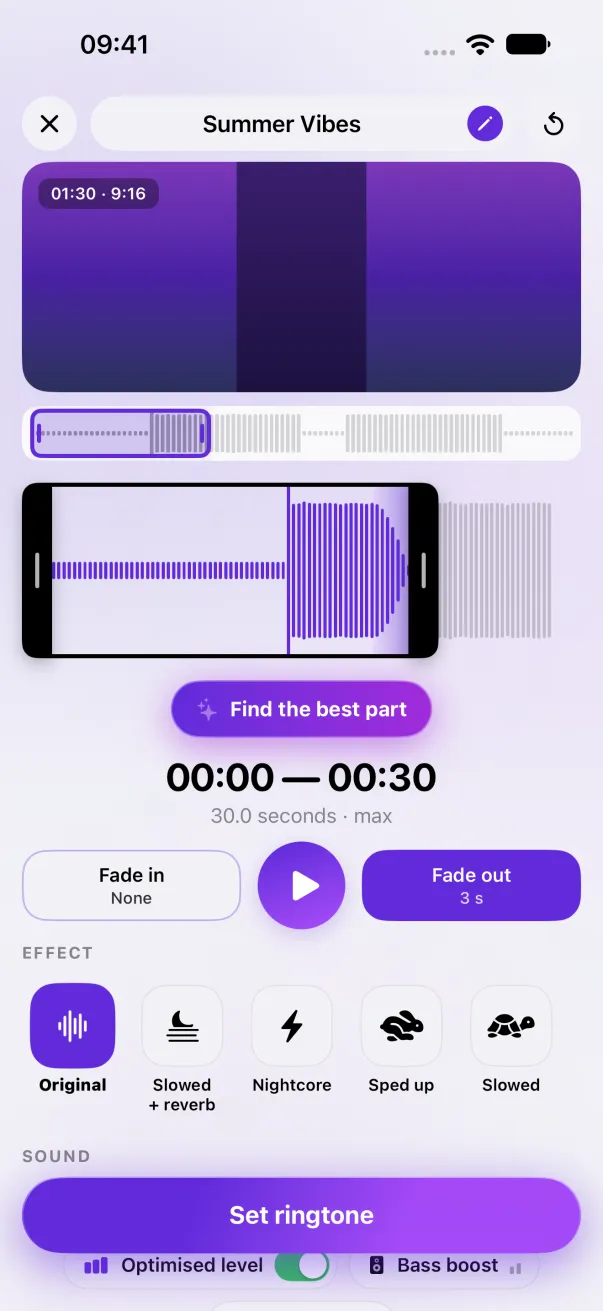
Open your music or video in Phone Ringtones, pick your part, then tap an effect in the row: Slowed + reverb, Nightcore, Sped up or Slowed. The effects are part of Premium; you can hear each one for 5 seconds for free.
Which effect for which sound?
- Slowed + reverb: the sound is slowed down and deeper, with a long echo. A calm, dreamy vibe. Three intensities: Light, Medium, Strong.
- Nightcore: much faster and higher-pitched, with bright highs. The most energetic one.
- Sped up: a bit faster and higher, with no echo. The chorus comes sooner.
- Slowed: a bit slower and deeper, with no echo.
The steps
- In Phone Ringtones, tap Video or Audio and pick your sound.
- Move the selection to the part you want.
- Tap an effect in the row below the timeline. For Slowed + reverb, pick the intensity right below it.
- Tap ▶: you hear exactly what will be saved, and the timeline shows the real length with the effect.
- Tap Set ringtone, then Use as Ringtone.
What about the 30 seconds?
An effect that slows the sound down makes the part longer: 30 seconds slowed down become about 35, and iOS refuses any ringtone longer than 30.0 seconds. So Phone Ringtones always cuts the result at 30 seconds and redoes the end fade at the cut. See The 30-second limit.
Free or Premium?
The effects are part of Premium. Without Premium, you can hear each of these four effects for 5 seconds on your own sound, to try it before you decide. The saved ringtone, though, has no effect until Premium is active.
A ready-made “sped up” version?
The sped up and slowed versions going around on social media are remixes of copyrighted songs: that's why Phone Ringtones doesn't offer any. The effect, however, works on your own file, for your own iPhone.
The easy way: Phone Ringtones
Pick a video, pick your part, install it. Free, on iPhone.