How to make a TikTok sound your ringtone on iPhone
TikTok doesn't let you download a sound on its own. But a video saved to your iPhone keeps its sound, and that's all you need to make a ringtone.
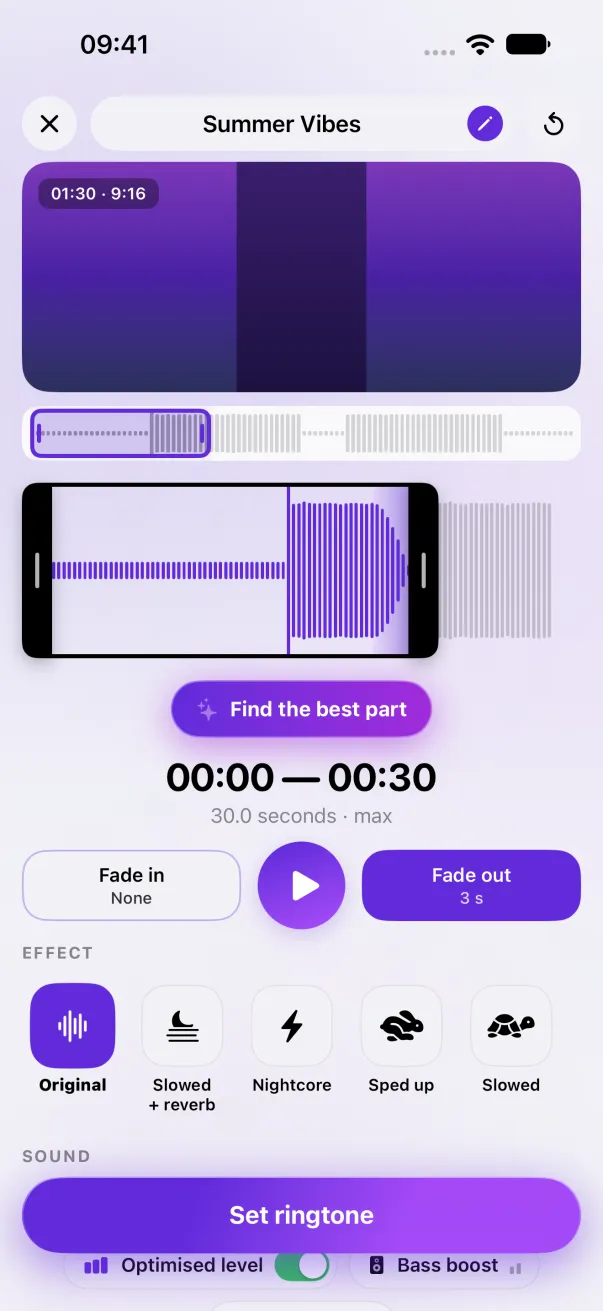
In TikTok, tap Share, then Save video. In Phone Ringtones, tap Video, pick it, keep the part with the sound and tap Set ringtone.
1. Save the TikTok video
- Open a video that uses the sound you want.
- Tap Share (the arrow on the side).
- Tap Save video. It lands in your camera roll, with its sound.
Found the sound on its own page (the spinning disc)? Open one of the videos that use it and save that one: the sound on that page can't be downloaded by itself.
2. Turn it into a ringtone
- Open Phone Ringtones and tap Video. Pick the video you saved.
- The app extracts the sound. Place the selection on the moment you want, 30 seconds at most.
- If the video starts with someone talking or a noise, move the start of the selection past it.
- Tap Set ringtone, then Use as Ringtone.
No “Save video” button?
The person who posted the video can turn off saving. If so, you have two options:
- Find another video with the same sound: on the sound's page, lots of videos use it, and most of them can be saved.
- Screen recording, for your personal use: open Control Center, tap Screen Recording, play the TikTok video with the sound on, then stop the recording. It lands in your camera roll with the app's sound.
A ringtone made from a video stays on your iPhone: don't repost it, the sound belongs to whoever made it.
Daily sounds, ready to go
Every day, the TikTok account @phoneringtones.app posts a royalty-free sound, and the same sound arrives in Phone Ringtones, at the top of the Ready to ring list on the home screen. Tap the bell next to it to open it in the editor, no video to save. Want a faster or slowed-down version? See Slowed + reverb, sped up, nightcore.
The easy way: Phone Ringtones
Pick a video, pick your part, install it. Free, on iPhone.